





Best Budget Mechanical Keyboard Guide 2026
You're probably staring at a shortlist that looks wildly inconsistent. One keyboard says it has tactile switches, another says it's 75%, another promises wireless, and then someone in the comments tells you to ignore all of that and just buy hot-swappable. For a first-time buyer, that's a fast way to feel lost.
The good news is that finding the best budget mechanical keyboard isn't about memorising keyboard jargon. It's about deciding what matters for your daily use, what you can skip, and what will still make sense a year from now. A smart budget buy should feel good to type on, fit your desk and workflow, and stay useful long enough that you don't end up replacing it too soon.
This matters even more in Singapore, where students, home users, and SMEs often need gear that balances price with reliability. A keyboard isn't just a desk accessory. It's one of the few devices you'll touch all day, whether you're writing reports, replying to customers, coding, or gaming after work.
Table of Contents
- Your Guide to Choosing a Great Budget Keyboard
- Understanding Mechanical Keyboard Essentials
- Prioritising Features on a Tight Budget
- Finding Value Beyond Brand New Keyboards
- Budget Keyboard Setups for Different Needs
- Extending the Life of Your Keyboard
Your Guide to Choosing a Great Budget Keyboard
A budget keyboard isn't a compromise by default. Often, it's the most rational choice. If you know your priorities, you can get the typing feel and practical features you need without paying for extras that won't change your day-to-day experience.
Most buyers get stuck because they compare too many things at once. Switch type, size, build material, wireless support, software, keycaps, backlighting. The easier way is to narrow the decision to a few questions.
Start with your real use case
Ask yourself these before looking at product pages:
- Where will you use it most. A desk at home, a shared office, a classroom, or a hybrid setup each points to different choices.
- Do you need a numpad. If you work with spreadsheets or accounting, a full-size layout may still be worth the extra space.
- How much desk space do you have. Compact layouts can make a cramped setup feel far more organised.
- Do you care more about silence or feedback. Some people want a soft, quiet press. Others type better when they can feel a clear bump.
Practical rule: Buy for the work you do most often, not the occasional scenario you imagine.
A lot of buyers also forget that the keyboard doesn't exist on its own. Comfort depends on the full desk setup. If you're trying to build a practical workspace rather than just chasing specs, this guide on choosing ergonomic mouse and keyboard sets is useful because it frames keyboards as part of posture, reach, and daily comfort.
Budget should mean selective, not cheap
The smartest buyers don't ask, “What's the cheapest mechanical keyboard?” They ask, “Which features will still matter after the novelty wears off?” A clean layout, dependable keys, and sensible connectivity usually age better than flashy RGB effects or marketing-heavy software.
A keyboard that fits your workflow also tends to last longer in practical terms. You keep using it because it still suits your routine. That's a better form of value than buying the lowest-priced option and replacing it when the annoyances pile up.
For SMEs, that same thinking supports resilience. Standardised, dependable peripherals are easier to maintain, easier to replace like-for-like, and less disruptive for teams. Good technology choices don't just reduce spending. They reduce friction.
Understanding Mechanical Keyboard Essentials
A mechanical keyboard uses individual switches under each key. That's the main difference from typical membrane keyboards, which rely on a softer rubber layer. In simple terms, a mechanical board gives each key its own mechanism, so key presses usually feel more consistent and more deliberate.
For many people, that's the first thing they notice. Typing feels clearer. Keystrokes feel less mushy. You don't need to be a hobbyist to appreciate that.
What makes a keyboard mechanical
Think of each key as having its own tiny button mechanism. When you press it, the switch activates in a predictable way. That predictability is why mechanical keyboards are popular for writing, office work, and gaming.
The big point isn't prestige. It's control. Once you know how different switches and layouts feel, it becomes easier to choose the best budget mechanical keyboard for your own use instead of relying on hype.
The three switch types most people compare
The easiest way to understand switches is by feel.
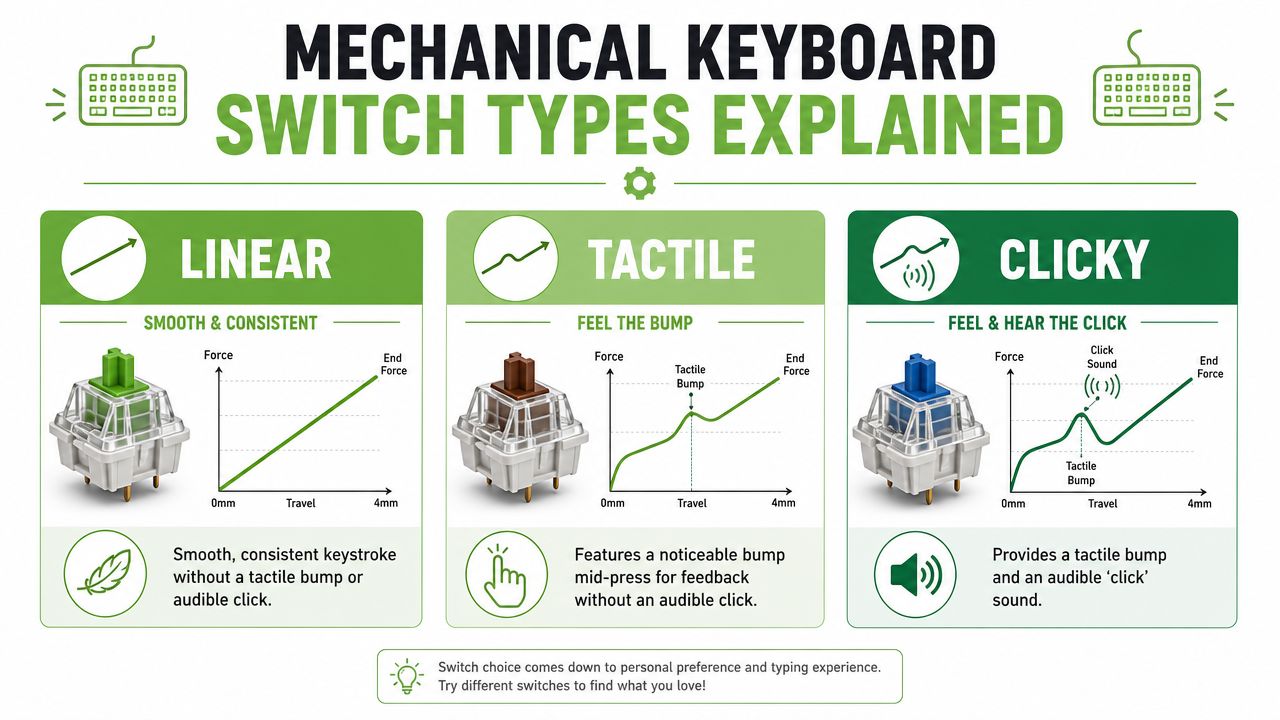
- Linear. This feels like pressing down on a smooth ramp. There's no bump in the middle of the keypress. Many users like this for gaming or for a softer, uninterrupted feel.
- Tactile. This has a small bump during the press. It gives feedback without adding a loud click, so it often suits mixed use.
- Clicky. This combines a bump with an audible click. Some typists enjoy the sharper feedback, but it can be distracting in shared spaces.
If you're sharing a room or office, tactile or linear usually causes fewer regrets than clicky.
Keyboard sizes and why they matter
Form factor sounds technical, but it just means keyboard size and layout.
| Layout | What it feels like in practice | Best for |
|---|---|---|
| Full-size | Like a family car. You get everything, including the number pad. | Data entry, admin work, finance tasks |
| TKL | Full-size without the numpad. A balanced middle ground. | General office use, work-from-home desks |
| 75% | Compact, but still keeps most important keys close together. | Small desks, students, portable setups |
| 60% | Minimal and space-saving. You give up more dedicated keys. | Very tight spaces, simple setups |
A smaller keyboard can make a desk feel cleaner and give your mouse more room. That matters more than people expect, especially in compact home setups.
Why hot-swappable matters for value
A hot-swappable keyboard lets you change switches without soldering. That matters because it lowers the cost of future experimentation. If you buy a board and realise the switches are too loud or too soft, you may be able to change only the switches instead of replacing the whole keyboard.
Tom's Hardware notes that the Keychron C2 Pro is a popular budget choice because it includes a hot-swappable PCB, which lets users change switches without soldering and helps extend the keyboard's lifespan while reducing long-term costs and e-waste in practical use through customisation (Tom's Hardware budget keyboard guide).
If you want a straightforward example of a wired mechanical board in this category, the Machenike K520E-B 108-key wired mechanical keyboard shows the kind of full-size option that suits users who want a familiar layout without moving into premium pricing.
Prioritising Features on a Tight Budget
When your budget is limited, every added feature should justify itself. That's the core decision. Not every upgrade improves daily use in the same way.
Some features affect feel and longevity. Others mainly affect appearance. If you separate those two, buying becomes much easier.
Where your budget should go first
Start with the parts you interact with constantly.
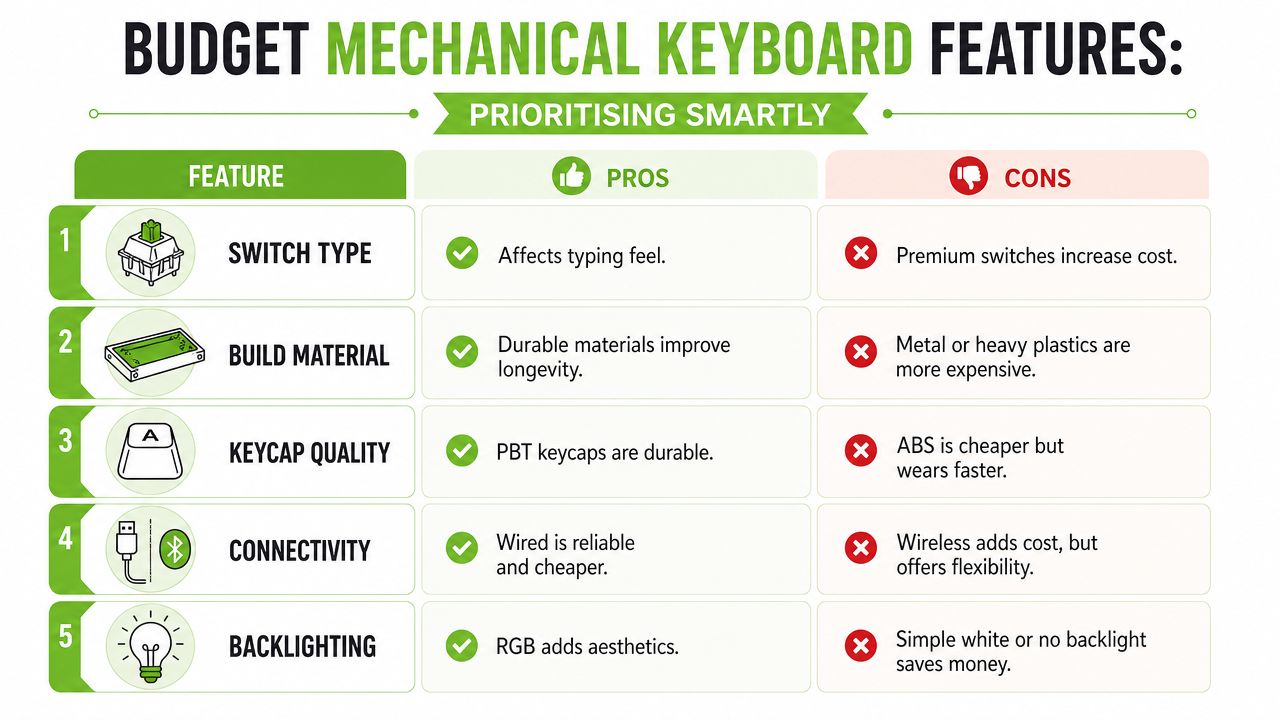
Switch feel should usually come first. You'll notice the feel of every keypress long before you notice whether the case is metal or whether the RGB has extra effects. A keyboard that looks impressive but feels wrong gets old quickly.
Connectivity comes next for many people. Wired is usually simpler and more predictable. Wireless helps if you move between devices or want less cable clutter. That's not a minor quality-of-life upgrade if your desk is small.
A short demonstration can help you compare what matters and what doesn't in entry-level buying decisions.
A simple trade-off table
| Feature | Worth prioritising when | Easier to compromise on when |
|---|---|---|
| Switch type | You type for hours or game regularly | You just need a secondary keyboard |
| Build material | You want a sturdier feel and plan to keep it long-term | You care more about price than premium feel |
| Keycap quality | You want better wear resistance over time | You're fine upgrading keycaps later |
| Wireless support | You use multiple devices or want a cleaner desk | The keyboard stays in one fixed spot |
| Backlighting | You work in dim rooms or want visual cues | You don't need lighting beyond aesthetics |
The biggest mistake is paying for too many “nice to have” features while ignoring the basics. A reliable wired board with the right switch feel often delivers better real value than a flashy wireless one with poor typing comfort.
What budget means in Singapore
In Singapore, the budget mechanical keyboard market is often defined as under $120 SGD, and that range gives buyers access to features like wireless connectivity and compact 75% layouts from brands such as Keychron and Royal Kludge that used to be associated with pricier options (Singapore community discussion on mechanical keyboards under $120 SGD).
That's a useful benchmark because it keeps expectations realistic. Under that ceiling, you can often get the core mechanical experience plus one or two meaningful extras. The trick is choosing the extras that fit how you work.
Spend on the feature you'll notice every day. Save on the one you'll only mention when someone asks what keyboard you bought.
Finding Value Beyond Brand New Keyboards
Most keyboard guides stop at new products. That's useful, but incomplete. If your goal is value rather than novelty, the better question is whether buying new is always necessary.
For many users, it isn't. A keyboard doesn't become useless just because the box has already been opened or because it comes from surplus inventory. What matters is condition, transparency, and whether someone has checked that it still performs properly.
Why new isn't always the smartest buy
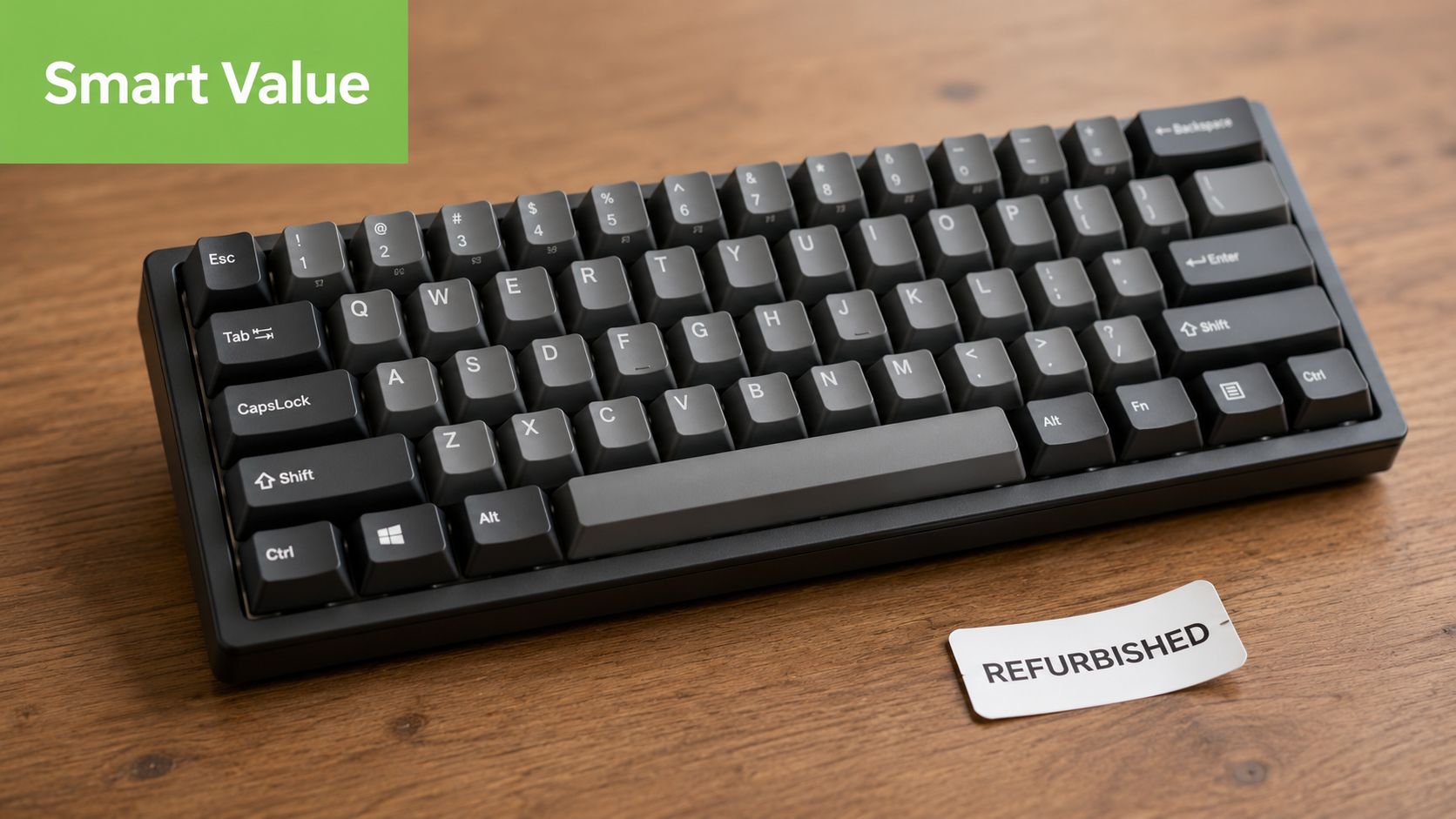
One gap in the Singapore market is clear. While many buying guides focus on new products, there's still limited information on whether refurbished budget mechanical keyboards with warranties are readily available locally, even though that's an important consideration for buyers who want better value and longer device lifecycles (TheSmartLocal article on mechanical keyboards in Singapore).
That gap matters because refurbished and surplus buying can be practical, not just frugal. A student may care about stretching a budget. An SME may care about equipping staff consistently without overspending. In both cases, lifecycle thinking makes sense. You're trying to match performance to need, not paying for “brand new” as a status marker.
This is also where a technology lifecycle partner is more useful than a simple retailer. A business like myhalo fits that role by focusing on repair, reuse, Certified ReLoved devices, Certified Surplus products and responsible recycling across categories, rather than treating every purchase as a one-off replacement decision.
What to check before buying refurbished or surplus
If you're considering a keyboard that isn't factory-fresh, look for these signs of a sensible deal:
- Condition disclosure. You should know whether wear is cosmetic or functional.
- Inspection process. A structured process matters more than broad claims about quality.
- Warranty clarity. Even a modest warranty can improve confidence if the terms are clear.
- Replacement path. If something goes wrong, you should know what support exists.
myhalo's broader refurbishment approach is useful here because it centres on Certified ReLoved, Certified Surplus, 30-point quality checks, transparent grading and practical after-sales support under ISO 9001 Certified and ISO 27001 Certified operations. Those practices are more commonly discussed for laptops and phones, but the same decision logic applies to peripherals. If you're weighing whether refurbished tech can make sense at all, this overview of refurbished laptop computers in Singapore gives a helpful reference point for how lifecycle-based buying works in practice.
For cost-conscious teams, that approach also supports resilience. Reuse and repair can help preserve budget, reduce unnecessary replacement cycles, and keep equipment in service longer. Sustainability is strongest when it also improves operational judgement.
Budget Keyboard Setups for Different Needs
A good keyboard choice looks different depending on who's using it. Instead of chasing a universal winner, it helps to match features to routines.
In Singapore, capable budget models such as the Royal Kludge RKM75 and Keychron K3 are available for under SGD 90, offering features like wireless connectivity and layouts suited to students and SMEs (Modern Home Singapore's mechanical keyboard guide). That makes them useful examples of what practical value can look like.
The space-saving student build
A student usually benefits from a compact layout and less cable clutter. A 75% or 60% board keeps the desk clear for notes, a laptop stand, or a tablet.
The RKM75 fits this kind of setup well as an example because it keeps the footprint manageable while still feeling more complete than the smallest layouts. If you're moving between a dorm room, library, and home, wireless support is a real convenience rather than a luxury.
The dependable work-from-home setup
For remote work, comfort and predictability matter more than visual flair. A quiet tactile or linear board in TKL or a practical compact layout often works better than something heavily styled for gaming.
The Keychron K3 is a useful illustration here because it appeals to people who want a cleaner desk and multi-device flexibility. If your job involves email, spreadsheets, meetings, and occasional travel, this kind of keyboard can keep the setup tidy without demanding much adaptation.
Pick the layout that reduces friction during a normal workday. That's usually the right layout for the long term too.
The entry-level gamer setup
For casual or entry-level gaming, response and stability matter more than premium materials. A wired keyboard is still a sensible choice if the board stays on one desk and you want a straightforward connection.
This is also the profile where buyers often overspend on lighting and branding. If the board feels responsive, has a layout you can learn quickly, and doesn't become tiring after a long session, that's already strong value. A durable budget model with a sensible switch choice often beats a more expensive board bought mainly for looks.
Extending the Life of Your Keyboard
A budget keyboard becomes a smart purchase when you keep it working well for years, not months. Mechanical keyboards help here because they're easier to maintain than many people think.
That's one reason wireless compact boards have become so appealing. RTINGS ranked the Royal Kludge RK61 as 2026's best cheap mechanical keyboard, with its wireless capability standing out as a practical advantage for users who want cleaner desk setups in compact spaces (RTINGS cheap mechanical keyboard rankings). Long-term satisfaction often comes from small daily conveniences like that, not only from headline specs.
A simple maintenance routine
Good maintenance doesn't need specialist knowledge. It needs consistency.
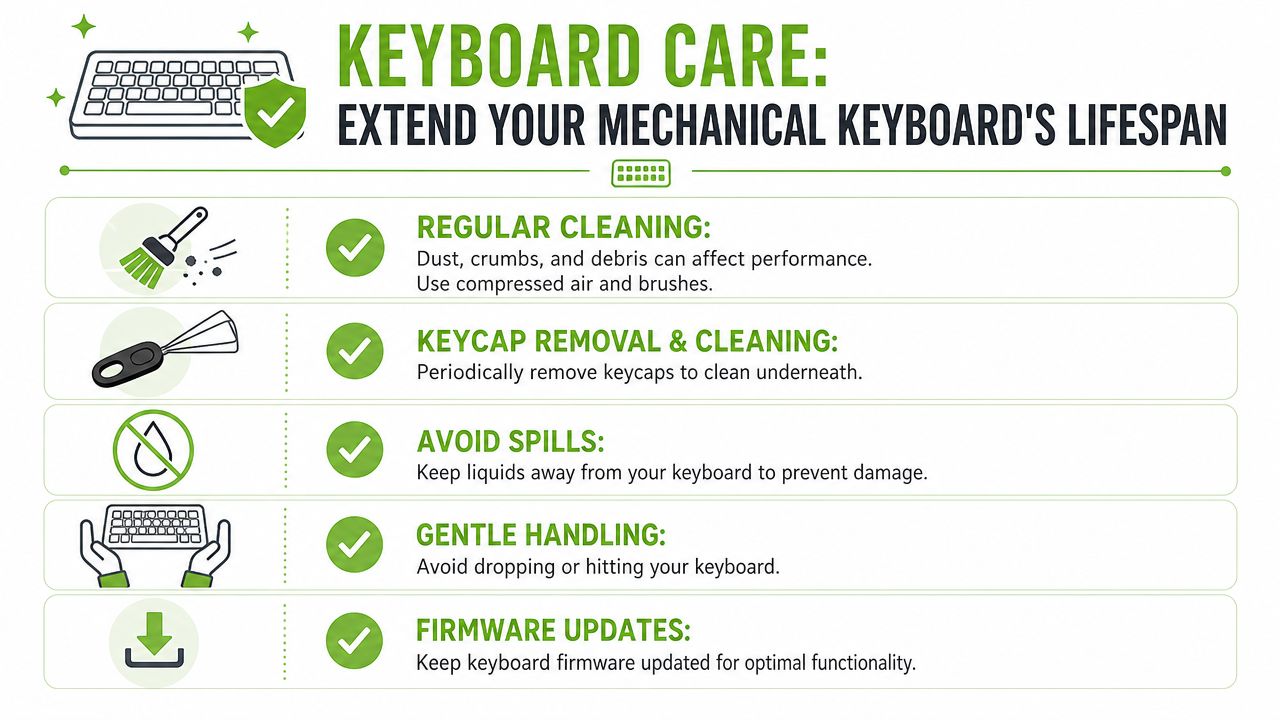
Try this routine:
- Brush away dust weekly. Crumbs and dust build up faster than one might expect, especially if you eat near your desk.
- Remove keycaps carefully from time to time. A simple clean underneath can improve both feel and appearance.
- Keep liquids away. Even a careful user only needs one spill to create an expensive problem.
- Update firmware if the model supports it. This matters more for wireless or multi-device boards.
- Store it properly if unused. Dust covers or a clean shelf beat leaving it exposed.
If you want a compact toolkit for this job, an electronics cleaning kit for keyboards and devices is the kind of accessory that makes regular upkeep easier without much effort.
Small habits that prevent early replacement
The best maintenance habits are boring, which is why they work.
- Don't yank cables. Pull from the connector, not the cord.
- Don't mash keys when frustrated. Mechanical switches are sturdy, but abuse still shortens the life of the overall board.
- Don't ignore early warning signs. A sticky key or uneven stabiliser is easier to address early than after months of use.
A keyboard also lasts longer when you buy with repair and reuse in mind. That's where lifecycle support matters. Services such as RescueAdvise and tools like the mylo AI Assistant are useful examples of a broader support model around devices, helping users make calmer decisions about maintenance, replacement timing, and smarter resource use instead of treating every issue as a reason to buy again.
A practical mindset usually saves more money than hunting for the lowest sticker price. When you choose carefully, maintain the keyboard properly, and stay open to certified refurbished or surplus options, the best budget mechanical keyboard becomes less about chasing trends and more about getting dependable value from technology you'll keep using.
If you're weighing new, Certified ReLoved, or Certified Surplus tech, myhalo is a practical place to start. It supports a full device lifecycle with transparent grading, battery health disclosure where relevant, 30-point quality checks, repair and reuse options, and responsible recycling, which helps consumers and SMEs make better long-term technology decisions instead of replacing devices too quickly.