





AI Features in Mobile: A Practical Buyer's Guide for 2026
You're on the MRT, and your phone is already doing more than making calls. A message arrives in another language, a voice note from school needs to be turned into action points, and your camera suggests a clearer shot of the menu you are trying to read. That is the quiet reality of AI features in mobile now, they show up in everyday moments, and the question is whether they help on the phone you can afford, maintain, and keep for longer.
For Singapore buyers, that question matters more than the usual flagship hype. Samsung's Singapore newsroom said in 2025 that more than 70% of Galaxy S25 users were already using Samsung and Google AI tools, with 47% relying heavily on AI every day and 45% using voice commands as often as typing, while Google Gemini usage tripled on the latest Galaxy S Series (Samsung Singapore newsroom). That points to a simple shift. Mobile AI is now part of routine use, not just something shown off in a launch video.
That does not mean every AI feature belongs only on the newest handset. Some tools run on the device itself, some depend on cloud support, and some are tied to newer chips or software updates, so the value depends on the phone in your hand, not just the model on a poster. A mid-range phone or a refurbished set can still make sense if its AI tools fit daily habits, battery needs, and how long you plan to keep it.
The other angle is longevity. Phones are not disposable gadgets for many Singapore buyers, they are tools that should survive commuting, work chats, photo editing, language help, and the occasional repair or resale decision. A good AI phone choice balances usefulness, privacy, repairability, battery life, and long-term value, and that is the standard this guide uses, with a practical lens shaped by real device eligibility, not just flagship marketing. For readers who want a wider view of the machine learning side behind these features, the RapidNative ML hub is a useful reference point.
Table of Contents
- Why AI Features in Mobile Now Matter to Everyday Buyers
- How AI Actually Works on a Phone
- The Five Places AI Shows Up in Your Phone
- What Works on Mid-Range and Refurbished Phones
- Privacy, Language, and the Trade-Offs Nobody Mentions
- A Practical Checklist for Buying an AI-Ready Phone
- Making a Smarter, Longer-Lasting AI Phone Decision
Why AI Features in Mobile Now Matter to Everyday Buyers
A hawker centre lunch can now involve a live translation prompt, a parent can turn a long school chat into a short summary on the MRT, and a small business owner can convert a voice note into task items before the next meeting. These aren't futuristic use cases, they're everyday ones, and they show why people now expect their phone to behave like a helper, not just a handset.
The shift is also commercial, not just behavioural. Sensor Tower said generative AI apps worldwide generated nearly $1.3 billion in in-app purchase revenue in 2024, up from $30 million in 2022 and $455 million in 2023, while downloads approached 1.5 billion in 2024, a 92% year-over-year increase (Sensor Tower). Those are global figures, but they matter in Singapore because this is a mobile-first market where app-based tools, search, notes, image generation, and assistant features tend to land early.
What that means in practice
The buying conversation has changed. People used to compare screen size, camera, and battery in isolation. Now they also need to ask whether the phone can do useful AI work without slowing down, draining the battery, or sending every task to the cloud.
Practical rule: If a feature saves you time once a week, it's a convenience. If it saves you time every day, it becomes part of the phone's value.
A second shift is that AI is no longer only a hardware story. The mobile-AI market has become a software economy layered on top of smartphones, so the question is whether the AI tools you want work smoothly in your normal routine. That's especially relevant in Singapore, where buyers often keep phones for a long time, pass them on, or look for refurbished options that still do the job well.
The most useful way to judge a phone now is simple: look at AI alongside camera quality, battery life, and price. If a device can help you translate, search, summarise, or organise without becoming a burden, it earns its place. If it only looks impressive in a demo, it's probably not worth paying extra for.
How AI Actually Works on a Phone
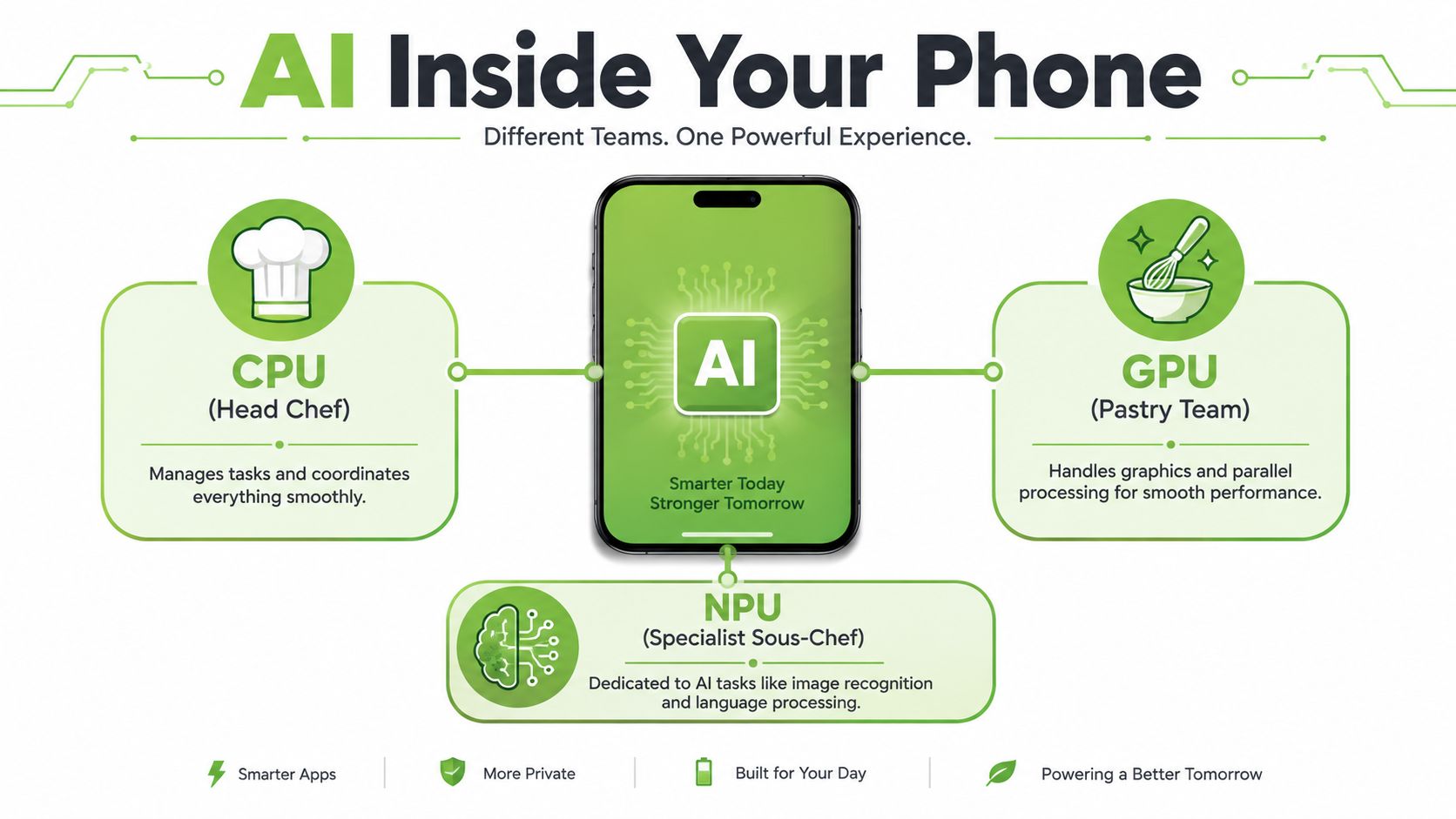
Think of a phone like a kitchen. The CPU is the head chef, it handles the general work. The GPU is the pastry team, good at lots of parallel tasks. The NPU, or neural processing unit, is the specialist prep station, built for repetitive AI work like recognising images, processing language, or making predictions quickly and efficiently.
That matters because not every AI task should be treated the same way. Routine jobs such as face authentication, voice commands, and camera adjustments can run locally on the device for speed and privacy, while heavier requests often go to the cloud for more computing power (Microsoft support explanation of mobile AI). In Singapore, where local operators are rolling out 5G Standalone and edge-capable services, the trade-off is often about how much work happens on the phone versus how much goes to a remote server (GSMA reference).
On-device and cloud AI in plain language
On-device AI feels instant because the phone doesn't have to ask a server for help every time. Cloud AI can be smarter or more flexible, but it depends on connectivity and can introduce delay. Most modern phones use a hybrid approach, where some tasks stay local and some move to the cloud.
That hybrid design explains why one feature might respond immediately while another takes a moment to think. It also explains why two phones with similar screens can feel very different in daily use. A phone with stronger dedicated AI hardware can process more of the work locally, which helps with responsiveness and reduces the pressure on data connections.
Why hardware matters more than marketing
Vendor claims about “AI-ready” devices sound simple, but the useful detail is usually in the chip architecture. Qualcomm's Snapdragon 8 Gen 3, for example, supports on-device multimodal AI models up to 10 billion parameters, mixed precision from INT4 to FP16, and roughly 20 tokens per second in on-device LLM workloads (Qualcomm product brief). That's not a spec most buyers need to memorise, but it does explain why some phones feel smooth while others struggle.
A phone's AI spec is only useful if the workload can run at interactive speed. If it has to pause too long, the feature stops feeling like a feature.
For readers who want to dig deeper into the software side of machine learning systems, the RapidNative ML hub is a helpful place to browse broader AI and ML concepts without jumping straight into jargon.
A good mental shortcut is this, parameters are the size of the model's learned knowledge, and tokens per second is a rough sign of how quickly the phone can process language. If those ideas sound abstract, that's normal. The only thing you need to remember is that the phone's chip, memory, and software support determine whether AI feels smooth or frustrating.
The Five Places AI Shows Up in Your Phone
A phone's AI features make more sense once you stop looking for one big “AI setting” and start looking at where the software helps during the day. In Singapore, that matters because many buyers are comparing new, mid-range, and refurbished phones side by side, then asking a simple question, which features still work well enough to justify the purchase? Samsung's Galaxy AI shows how these tools can spread across imaging, communication, organisation, and search, while Google's Pixel lineup offers another example of how the same phone can handle several AI tasks at once (Samsung Galaxy AI context, Google Pixel AI examples).
Camera and imaging
The camera is usually the first place people notice AI. It can recognise scenes, adjust exposure, reduce noise, and make portraits or night shots look cleaner before you even open an editing app. For many buyers, that feels like an automatic photo assistant standing behind the lens, helping the image look more balanced without extra effort.
That is why camera AI often gets the most attention on specs pages, even on phones that are not top-tier models. A refurbished phone with a capable camera system may still benefit from these features if the software support is there, because the AI work is focused on improving the shot you already took rather than running a heavy task in the background.
Battery and performance management
AI also helps the phone learn usage patterns. It can notice which apps you open often, when you usually charge, and which background tasks can be slowed down so the battery lasts longer and the phone stays more responsive.
For buyers, this is the kind of AI that is easy to miss but hard to live without once it works well. A phone that stays comfortable to use across the day is usually more useful than one that only sounds impressive on a product page. In other words, the AI here is doing housekeeping, not showing off.
Personalisation and assistants
Some AI features behave like a helpful front-desk assistant for your phone. They surface reminders, suggest next actions, and pull up useful information when the device has enough context to understand what you are doing. Google's Pixel features such as Magic Cue and Gemini Live show this clearly, and the Google Pixel 7 Pro blog post is a useful reference point for seeing how these ideas appear in real devices.
The benefit is convenience. The trade-off is that the phone often needs more personal context to give a good answer, which can feel helpful in one moment and intrusive in another. That balance matters for buyers who want practical assistance without handing every part of daily life to software.
Security and privacy
AI also sits behind face recognition, spam filtering, call screening, and similar trust features. These tools reduce small daily hassles because they can sort through noise before you have to deal with it yourself.
That is useful for anyone who receives many unknown calls or messages. PosturaZen's AI screening method is a good reminder that smartphone AI is not limited to convenience features, it can also support specialised screening and analysis in more focused use cases. The same basic idea applies here, software can look for patterns faster than a person would want to do manually, then flag what seems worth attention.
Communication and productivity
This is the category that feels most relevant to daily life in Singapore. Circle to Search lets you circle, tap, or scribble on screen to search without leaving the app, which fits the way people often move between chat, shopping, maps, and work messages in one session (STL Partners overview). Translation, call notes, and transcription sit in the same family of tools, because they help you handle language and information faster when the moment is moving quickly.
On phones that support it, these features can make a mid-range or refurbished device feel much more capable than its price suggests. They do not need to be flashy to be useful. A cleaner summary, a translated phrase, or a quick search from on-screen text can save time in a way that feels very practical.
| Category | What it does | Typical use case |
|---|---|---|
| Camera and imaging | Improves shots automatically | Night photos, portraits, scene detection |
| Battery and performance management | Learns usage patterns | Smoother day-to-day battery life |
| Personalisation and assistants | Surfaces relevant actions | Reminders, summaries, app suggestions |
| Security and privacy | Screens or authenticates activity | Face unlock, spam filtering, call screening |
| Communication and productivity | Speeds up search and text work | Translation, transcription, Circle to Search |
What Works on Mid-Range and Refurbished Phones
Flagship AI gets the headlines, but many buyers in Singapore don't shop that way. They want a device that lasts, stays within budget, and still handles useful AI functions without turning into a laggy compromise. That's where the key questions begin, because not every AI feature needs top-tier hardware to feel worthwhile.
Some tools work well on older or refurbished phones because they're lightweight or can rely on simpler local processing. Basic camera enhancement, suggestion-based automation, offline voice commands, and simpler search shortcuts often remain usable if the phone has enough RAM, a supported OS version, and a healthy battery. More demanding features, such as long-document summarisation, advanced live translation, or voice cloning, usually need newer silicon and more memory to stay responsive.
A simple way to judge compatibility
Use the feature, not the marketing term, as your test. If the tool depends on constant context, large models, or real-time transcription, it's more likely to benefit from flagship hardware. If it mostly adjusts photos, suggests an action, or runs a routine helper task, a mid-range or refurbished phone may still be fine.
That's why a broad “AI phone” label is misleading. The experience sits on a spectrum. A Certified ReLoved device can still be a sensible option for buyers who want practical AI without paying for every premium capability, especially if the phone is already strong on battery health, software support, and storage.
Useful test: Ask the seller whether the feature runs locally, depends on cloud access, or is limited to certain chipsets. That single question filters out a lot of vague advertising.
For a deeper look at what to check before choosing a pre-owned device, myhalo's guide on things to look out for before buying a refurbished phone is a useful reference point.
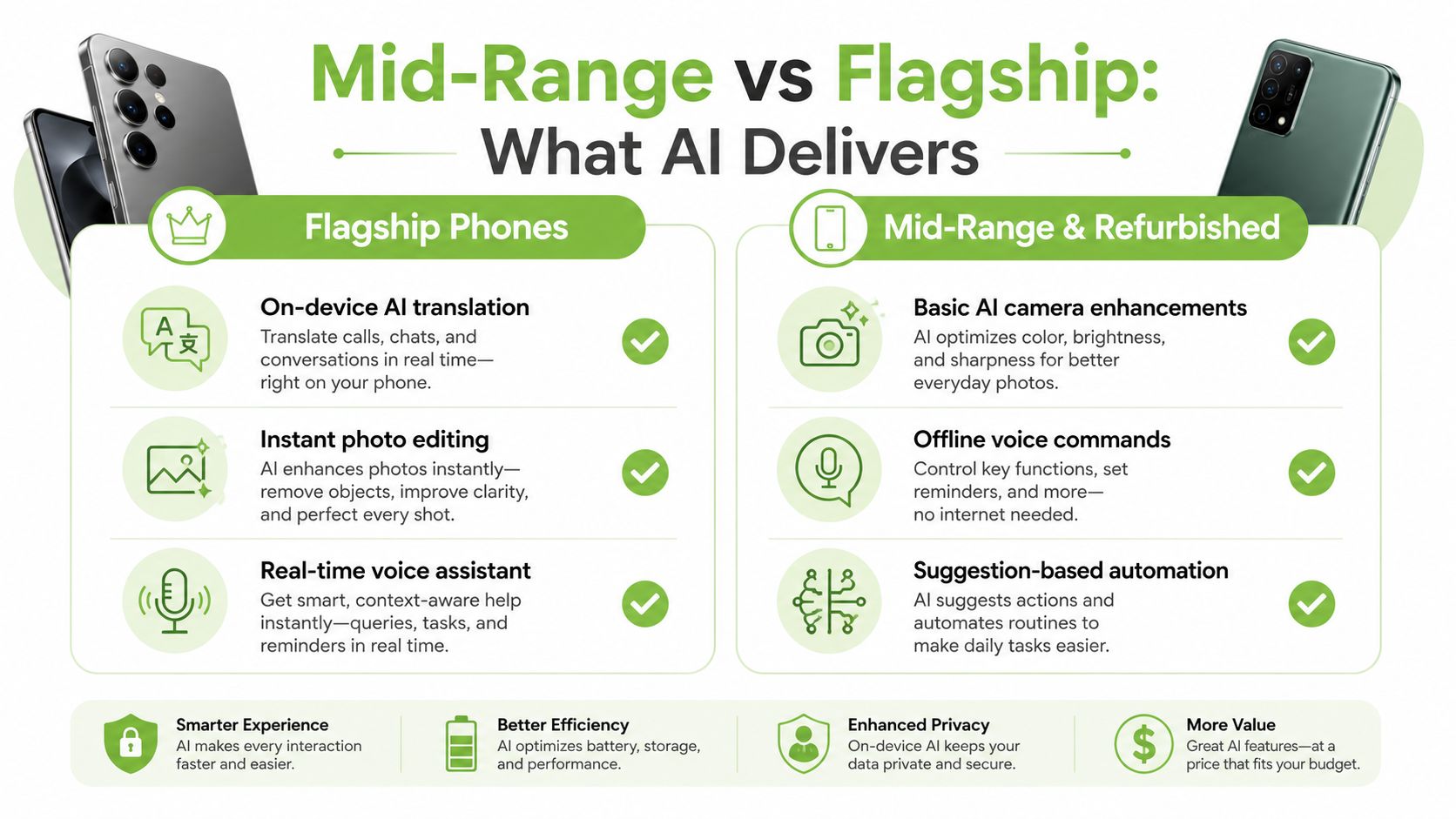
For buyers who want a quick comparison, the safest expectation is this, flagship phones usually handle the most demanding AI tasks with more headroom, while mid-range and refurbished phones do best when you focus on the features that improve daily convenience rather than the most compute-heavy demos. That framing protects both your budget and your patience.
Privacy, Language, and the Trade-Offs Nobody Mentions
The part of mobile AI that gets missed most often is data flow. Once you turn on voice help, call notes, screenshot analysis, or translation, the phone starts handling more of your context. That is convenient, but it also means you should know where the information goes, what stays on the device, and what gets sent out for cloud processing.
In Singapore, that question matters even more because real conversations are rarely neat or uniform. People mix English with Mandarin, Malay, Tamil, and local expressions, and AI tools do not always handle that mix with the same confidence. A feature can look polished in a demo, then struggle when accents, code-switching, or names fall outside the model's expectations.
Questions that matter before you switch features on
Before you use voice transcription, live translation, or call summaries, check a few practical points. Does the feature still work with limited connectivity, or does it need the cloud each time? Can you see what data it accesses and control it? If you change the privacy settings, does the function still work properly, or does it break in ways that are hard to spot?
That is not paranoia. It is the same habit you would use before handing someone a set of house keys. AI tools can save time, but only if the consent flow is clear and the user understands what happens with transcripts, contacts, screenshots, and voice recordings.
Routine use can make these features feel ordinary, as noted earlier. The better habit is to keep convenience and control together, so the phone helps without taking more than you expect.
A simple way to judge any AI feature is to check three things, what data it touches, whether it still works offline or with limited connectivity, and how well it handles your own language mix. If a seller cannot answer those questions clearly, the feature is probably more impressive on a brochure than in daily life.
A Practical Checklist for Buying an AI-Ready Phone
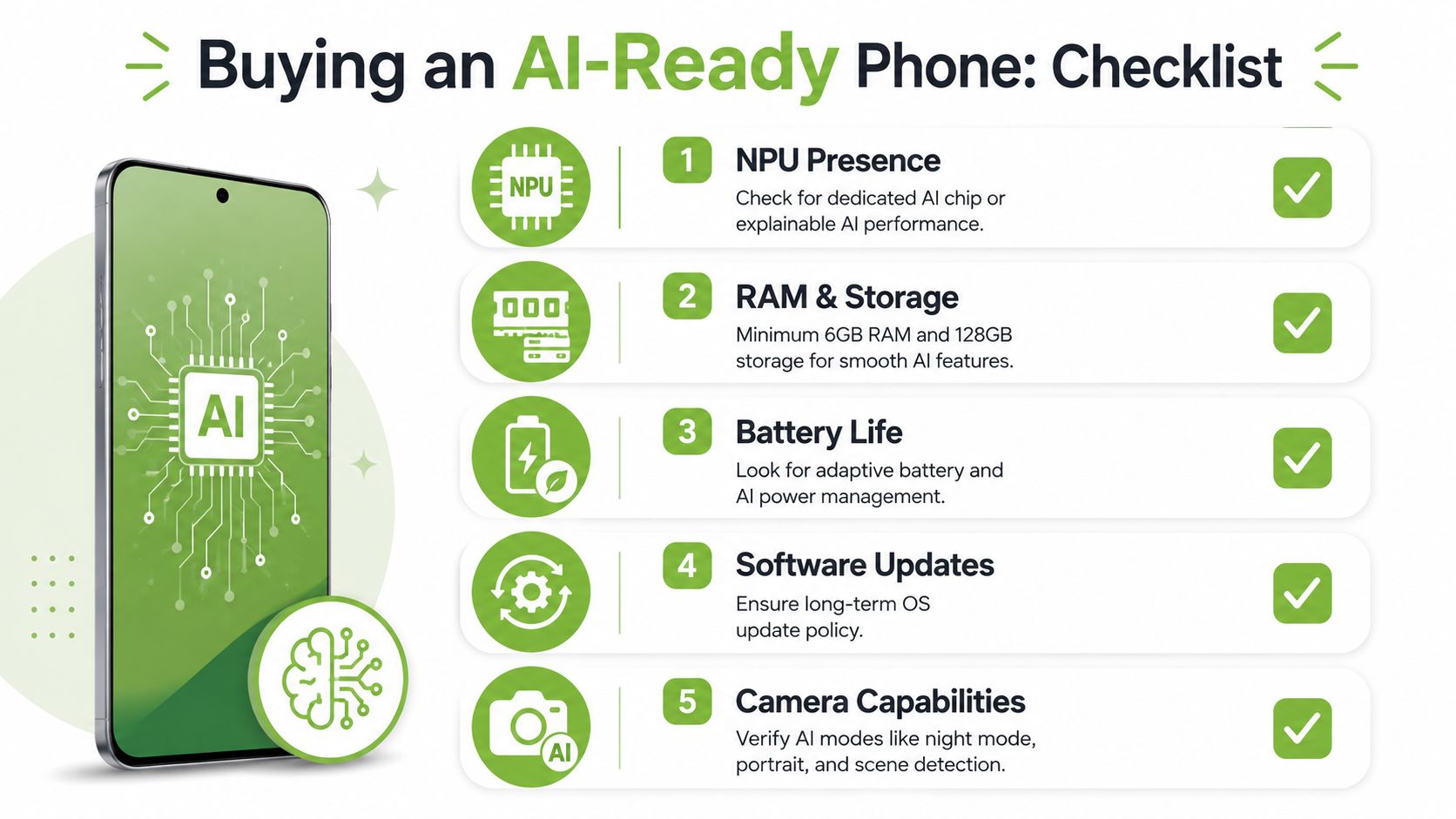
The best AI phone is the one that can do the job you need, today and a year from now. Start with the chip, then move to memory, storage, battery, and software support. If the phone fails on any of those basics, the AI features won't feel smart for long.
What to check first
- NPU presence: Look for a dedicated AI processor or a clearly explained AI engine. If the brand can't explain how the AI work is handled, the claim may be more marketing than substance.
- RAM and storage: A smoother experience usually needs enough headroom for apps, caches, photos, and AI tasks to coexist without constant slowdowns.
- Battery life: AI is only useful if the phone still lasts through the day without aggressive charging habits.
- Software updates: Long-term OS support matters because AI features often depend on newer system capabilities.
- Camera capabilities: If the phone is a big part of your photography, check for useful AI modes such as night mode, portrait, and scene detection.
For buyers comparing value phones, myhalo's article on cheap mobile phones in Singapore is a good reminder that “cheap” only helps if the device still meets your practical needs.
Questions to ask before you buy
A useful AI-ready phone should also come with clear support. Ask about warranty, repair options, battery health disclosure, and data migration support. That matters because a phone that can't be maintained is a weak long-term purchase, no matter how impressive the AI demo looked in store.
Lifecycle thinking helps. A well-checked Certified ReLoved or Certified Surplus device can be a smarter route than chasing a new flagship, especially if the seller provides transparent grading and a clear picture of condition. 30-point quality checks, ISO 9001 Certified processes, and ISO 27001 Certified handling are the kinds of signals that help buyers judge whether the device has been prepared responsibly.
Buyer's shortcut: Don't ask, “Is this an AI phone?” Ask, “Which AI tasks will this phone actually handle well for my use case, and for how long?”
Making a Smarter, Longer-Lasting AI Phone Decision
A good AI phone decision starts with your own habits. If you mostly want translation, search, transcription, or camera help, you don't need to chase the most expensive flagship every cycle. If you need the fastest on-device generative features, then chipset and memory matter more, and you should be precise about that before you pay extra.
The broader lesson is that AI features work best when they sit inside a phone lifecycle you can sustain. That means repairability, responsible recycling, trade-in options, and honest device grading matter just as much as model names. In Singapore, value, resilience, and smarter resource use are part of the same decision, because a phone that stays in use longer usually gives better return on every dollar spent.
The simplest framework is this, define the AI tasks you care about, match them to the hardware they need, then choose the buying route that fits your budget and support needs. Sometimes that will be a new device. Sometimes it will be a professionally checked refurbished one. Either way, the smartest purchase is the one that lasts.
If you want help choosing a phone that balances AI capability with value and long-term use, visit myhalo for new, Certified ReLoved, and Certified Surplus options, plus repair, recycling, and trade-in support in Singapore. myhalo can also help you extend a device's life with transparent grading, battery health disclosure, and practical after-sales care, so you can buy with more confidence and less waste.